AI Test Studio documentation
Everything teams need to understand how AI Test Studio works: product capabilities, supported inputs, review and regeneration flow, integrations, governance controls, and privacy-oriented design for EU and US teams.
Overview
AI Test Studio is a Jira Cloud app that helps teams generate high-quality test cases from Jira issues using GPT-5.4 reasoning. The app is designed for review-first QA workflows where users want faster test design without giving up control over what gets created.
It supports manual test cases and BDD / Gherkin scenarios, can use extra Jira context and attachments as input, and can create approved output directly in Jira, Xray Cloud, or Zephyr Scale / Essentials.
AI generation
GPT-5.4 reasoning
The product is designed around GPT-5.4-powered reasoning to generate more complete, structured, and usable test suites from requirements.
Manual and Gherkin output
Teams can generate classic step-by-step manual test cases or BDD / Gherkin scenarios from the same Jira-driven flow.
Built for practical QA
The focus is not generic AI text, but actionable test design that can be reviewed, selected, and published into existing QA workflows.
Context and attachments
AI Test Studio can generate tests from more than the issue description alone. The app can use a combination of:
- Jira summary and description
- Acceptance criteria or relevant issue text
- Configurable Jira context fields chosen by administrators
- Supported attachments selected as additional AI input
This richer context helps produce more relevant, traceable, and complete tests instead of generic output with weak alignment to the source requirement.
Review and regeneration
Preview before create
Generated tests are reviewed before creation so users can keep control over what is actually published.
Select relevant cases
Teams can review and keep the most useful generated output rather than blindly creating every AI-generated suggestion.
Safe regeneration
If AI-generated tests already exist, the app supports safe regeneration by unlinking prior results instead of deleting earlier issues.
Outputs and workflows
AI Test Studio is designed to fit different QA team styles and downstream workflows.
- Manual mode: generates structured test cases with descriptions, steps, data, and expected results.
- BDD / Gherkin mode: generates behavior-driven scenarios for teams that prefer specification-style tests.
- Issue-centric flow: generation starts from the Jira issue so requirements and generated tests remain closely connected.
- Traceability-friendly workflow: generated output stays tied to the original requirement and can be regenerated as requirements evolve.
Integrations
Jira Cloud
Native issue-centric workflow for generating and managing AI-assisted test creation directly inside Jira.
Xray Cloud
Approved output can be created in Xray Cloud for teams already managing execution, coverage, and reporting there.
Zephyr Scale / Essentials
Teams using Zephyr can create approved AI-generated tests inside their current test management process instead of changing tools.
Enable AI Test Studio in a Jira issue
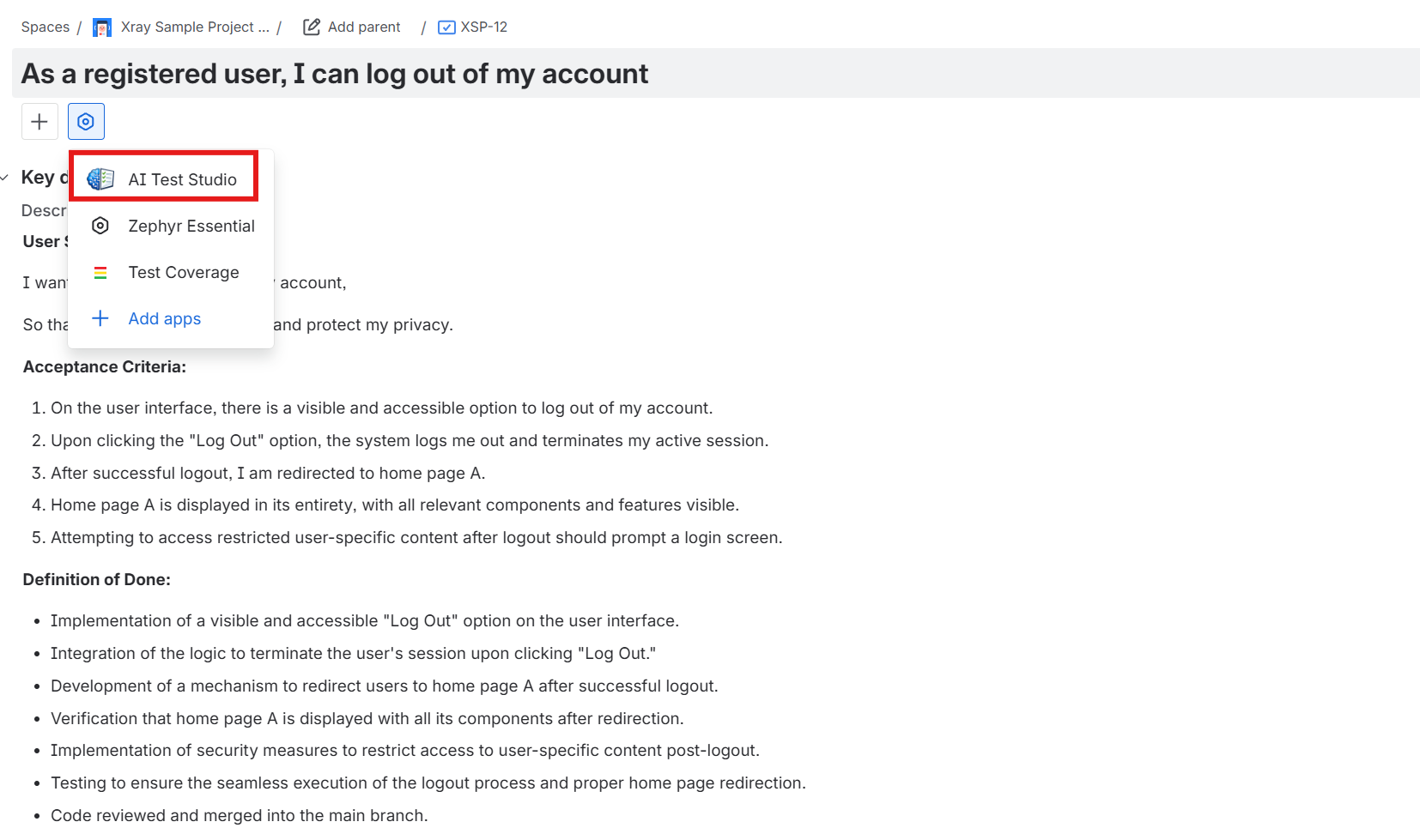
After installation, users can access AI Test Studio directly from the Jira issue view. This keeps test generation close to the original requirement and makes it easy to generate manual test cases or Gherkin scenarios using the current issue content, configurable Jira context, and supported attachments.
- Open a Jira issue in Jira Cloud.
- Locate AI Test Studio in the issue view.
- Open the app from the issue panel or app entry point.
- Generate review-ready test cases from the issue context.
- Review the output before creating approved tests in Jira, Xray Cloud, or Zephyr Scale / Essentials.
Admin controls and governance
The app includes controls designed for real team environments and Marketplace distribution.
- Restrict availability by Jira project
- Restrict availability by issue type
- Configure which Jira fields are sent as AI context
- Manage integrations such as Xray and Zephyr
- Support licensing and operational configuration at site level
Privacy and operations
AI Test Studio is designed with a privacy-aware and operationally practical approach for teams in the EU and US, with generation powered through the official OpenAI platform.
- Minimizes persistent storage of Jira end-user content outside Atlassian wherever possible
- Uses review-first generation so users stay in control before artifacts are created
- Stores limited operational metadata such as configuration, token usage metadata, model information, and timestamps
- Supports asynchronous generation for richer prompts and longer-running workflows
For the formal policy text, see the Privacy Policy.
Supported attachments
Supported attachments include the following categories and formats:
- Images: PNG, JPG / JPEG, GIF, WEBP
- Documents: PDF, DOC, DOCX, XLS, XLSX, PPT, PPTX
- Text and structured files: TXT, Markdown, HTML, CSV, JSON, XML, RTF